
Tomato Basil
LangChain - chat with my data 본문
LangChain을 이용하여 RAG 기반의 챗봇 "chat with my data"를 만들어보는 미니 프로젝트이다.

LangChain은 LLM 어플리케이션 제작을 위한 오픈소스 프레임워크이다.
Python 과 TypeScript 패키지가 있으며, 모듈러 컴포넌트도 있지만 end to end 탬플릿도 있다.
템플릿의 예시로는 다음과 같이 있다.
- Prompts
- Models
- Indexes
- Chains
- Agents

이번 프로젝트는 '랭체인을 이용해 데이터와 채팅하기' 이다.
벡터 스토어(Vector Store)에 데이터를 로딩하는 과정, 벡터 스토어로부터 질문에 대한 답을 가져오는 과정으로 나뉜다.
1. 문서 로딩 (document loading)
Loader
데이터를 수집하는 로더는 웹사이트나 데이터베이스 등의 소스에서 PDF/HTML/JSON/Word ... 형식의 데이터에 접근한 후 알맞은 형태로 전환한다.
랭체인에는 unstructured/structured와 public(대부분 온라인 데이터)/proprietary(.pdf, .txt, email, figma, notion 등)에 따라 문서를 분류할 수 있는 다양한 로더들이 있다.
Document Loading
로더를 이용해서 문서를 로드하는 작업
import os
import openai
import sys
from dotenv import load_dotenv, find_dotenv
sys.path.append('../..')

_ = load_dotenv(find_dotenv()) # read local .env file

openai.api_key  = os.environ['OPENAI_API_KEY']


# document loading
# pdf
from langchain_community.document_loaders import PyPDFLoader
loader = PyPDFLoader("docs/lectures/MachineLearning-Lecture01.pdf")
pages = loader.load()

print(len(pages))
page = pages[0]
print(page.page_content[0:500])
print(page.metadata)

# url
from langchain_community.document_loaders import WebBaseLoader

loader = WebBaseLoader("https://www.tate.org.uk/art/art-terms/d/documentary-photography")
docs = loader.load()
print(docs[0].page_content[:500])

# notion
from langchain_community.document_loaders import NotionDirectoryLoader
loader = NotionDirectoryLoader("docs/notion_db")
docs = loader.load()

print(docs[0].page_content[0:200])
print(docs[0].metadata)
2. 문서 스플리팅 (document splitting)
로드한 문서들은 이제 Vectore Store에 저장하기 위해 작은 청크(chunk)들로 나눠줘야 한다.
이때 각각의 청크의 크기(chunk_size)와 오버랩 정도(chunk_overlap)는 직접 결정할 수 있는데, 오버랩 정도는 슬라이딩 윈도우처럼 각 청크의 시작과 끝이 겹치는 정도를 의미한다.
텍스트를 스플릿할 때는 create_documents() 방법을, 문서를 스플릿할 때는 split_documents() 방법을 사용한다.
스플리터(Splitter)의 종류 또한 여러 가지다.
eos에 집중하거나, 메타 데이터에 집중하거나, 등등 각각의 스플리터가 집중적으로 다루는 특성이 다르다.
RecursiveCharacterTextSpllitter() - character 중심으로 나누기 + 다른 character로 나누기가 될 때까지 재귀적으로 시도
CharacterTextSplitter() - character 중심으로 나누기
MarkdownHeaderTextSplitter() - 마크다운 파일을 특정 헤더 중심으로 나누기
Language() - C++, Python, Roby, Markdown etc
...
이중 RecursiveCharacterTextSpllitter와 CharacterTextSplitter가 자주 쓰이는 스플리터라고 한다.
2-1. Recursive splitting
i. RecursiveCharacterTextSpllitter vs. CharacterTextSplitter 비교 예시)
text = "a b c d e f g h i j k l m n o p q r s t u v w x y z"

chunk_size = 26
chunk_overlap = 4


# 1.
r_splitter = RecursiveCharacterTextSplitter(
    chunk_size=chunk_size,
    chunk_overlap=chunk_overlap
)
r_splitter.split_text(text)

# 출력: ['a b c d e f g h i j k l m', 'l m n o p q r s t u v w x', 'w x y z']


# 2.
c_splitter = CharacterTextSplitter(
    chunk_size=chunk_size,
    chunk_overlap=chunk_overlap
)
c_splitter.split_text(text)

# 출력: ['a b c d e f g h i j k l m n o p q r s t u v w x y z']


# 3.
c_splitter = CharacterTextSplitter(
    chunk_size=chunk_size,
    chunk_overlap=chunk_overlap,
    separator = ' '
)
c_splitter.split_text(text)

# 출력: ['a b c d e f g h i j k l m', 'l m n o p q r s t u v w x', 'w x y z']
ii. 일반적인 텍스트에 주로 사용되는 RecursiveCharacterTextSplitter 예시)
some_text =
"""When writing documents, writers will use document structure to group content. \
This can convey to the reader, which idea's are related. For example, closely related ideas \
are in sentances. Similar ideas are in paragraphs. Paragraphs form a document. \n\n  \
Paragraphs are often delimited with a carriage return or two carriage returns. \
Carriage returns are the "backslash n" you see embedded in this string. \
Sentences have a period at the end, but also, have a space.\
and words are separated by space."""

c_splitter = CharacterTextSplitter(
    chunk_size=450,
    chunk_overlap=0,
    separator = ' '
)
r_splitter = RecursiveCharacterTextSplitter(
    chunk_size=450,
    chunk_overlap=0,
    separators=["\n\n", "\n", " ", ""]
    # 기본 seperator들. 두줄, 한줄, 공백, (공간x, 즉 char by char) 순서로 스플릿이 진행.
)

c_splitter.split_text(some_text)
# 출력 : ['When writing documents, writers will use document structure to group content. This can convey to the reader, which idea\'s are related. For example, closely related ideas are in sentances. Similar ideas are in paragraphs. Paragraphs form a document. \n\n Paragraphs are often delimited with a carriage return or two carriage returns. Carriage returns are the "backslash n" you see embedded in this string. Sentences have a period at the end, but also,', 'have a space.and words are separated by space.']


r_splitter.split_text(some_text)
# 출력 : ["When writing documents, writers will use document structure to group content. This can convey to the reader, which idea's are related. For example, closely related ideas are in sentances. Similar ideas are in paragraphs. Paragraphs form a document.", 'Paragraphs are often delimited with a carriage return or two carriage returns. Carriage returns are the "backslash n" you see embedded in this string. Sentences have a period at the end, but also, have a space.and words are separated by space.']
iii. 온점(.)을 seperator로 추가하고 chunk_size를 조금 줄인 예시)
# 중간에 온점(.)이 껴있다. 잘 안 나온 예시.
r_splitter = RecursiveCharacterTextSplitter(
    chunk_size=150,
    chunk_overlap=0,
    separators=["\n\n", "\n", "\. ", " ", ""]
)
print(r_splitter.split_text(some_text))

# 출력 : ["When writing documents, writers will use document structure to group content. This can convey to the reader, which idea's are related. For example,", 'closely related ideas are in sentances. Similar ideas are in paragraphs. Paragraphs form a document.', 'Paragraphs are often delimited with a carriage return or two carriage returns. Carriage returns are the "backslash n" you see embedded in this', 'string. Sentences have a period at the end, but also, have a space.and words are separated by space.']


# 수정 - 올바른 예시.
r_splitter = RecursiveCharacterTextSplitter(
    chunk_size=150,
    chunk_overlap=0,
    separators=["\n\n", "\n", "(?<=\. )", " ", ""]
)
print(r_splitter.split_text(some_text))

# 출력 : ["When writing documents, writers will use document structure to group content. This can convey to the reader, which idea's are related. For example,", 'closely related ideas are in sentances. Similar ideas are in paragraphs. Paragraphs form a document.', 'Paragraphs are often delimited with a carriage return or two carriage returns. Carriage returns are the "backslash n" you see embedded in this', 'string. Sentences have a period at the end, but also, have a space.and words are separated by space.']
iv. pdf나 notion 문서를 스플릿 한다면?
from langchain.text_splitter import CharacterTextSplitter
text_splitter = CharacterTextSplitter(
    separator="\n",
    chunk_size=1000,
    chunk_overlap=150,
    length_function=len
)


# PDF 스플릿
# pages보다 docs 수가 더 많을 것이다.

from langchain.document_loaders import PyPDFLoader
loader = PyPDFLoader("피디에프파일.pdf")
pages = loader.load()

docs = text_splitter.split_documents(pages)

print("pages, docs : ", pages, docs)


# notion  스플릿
# pages보다 notion_db 수가 더 많을 것이다.

from langchain.document_loaders import NotionDirectoryLoader
loader = NotionDirectoryLoader("노션 폴더")
notion_db = loader.load()

docs = text_splitter.split_documents(notion_db)

print("pages, notion_db : ", pages, notion_db)
2-2. Token splitting
토큰 개수에 따라 스플릿하는 방법이다.
LLM은 토큰마다 context window를 가지므로, LLM 사용 시에는 이 방법이 유리할 수 있다.
토큰은 주로 4개까지의 character로 이루어진다고 한다.
만약
chunk_size=1, chunk_overlap=0
로 텍스트를 스플릿한다면, 서로 관련 있는 토큰들의 리스트를 반환할 것이다.
i. TokenTextSplitter 예시
from langchain.text_splitter import TokenTextSplitter

# 텍스트 스플릿
text_splitter = TokenTextSplitter(chunk_size=1, chunk_overlap=0)

text1 = "foo bar bazzyfoo"

text_splitter.split_text(text1)

# 출력 : ['foo', 'bar', 'b', 'az', 'zy', 'foo']


# 문서 스플릿
text_splitter = TokenTextSplitter(chunk_size=10, chunk_overlap=0)

docs = text_splitter.split_documents(pages)

docs[0]

# 출력 : Document(page_content='제목  \n', metadata={'source': '파일 경로', 'page': 0})

pages[0].metadata

# 출력 : {'source': '파일 경로', 'page': 0}
하지만 이렇게 할 경우, docs[0]에는 문서의 이름, 메타데이타(파일 경로, 페이지) 정보만 들어있다.
각 청크에 메타데이타를 더 필요로 할 경우,
예를 들면 그 청크가 문서의 어느 부분에 위치하고 있는지, 어떤 부분과 관련이 있는지 알고 싶거나
청크에 대한 문답을 행할 때는 어떻게 할까?
각 청크의 메타데이타에 추가적인 정보를 더해주는 스플리터를 사용하면 된다.
2-3. Context aware splitting
MarkdownHeaderTextSplitter는 마크다운 파일을 헤더(혹은 서브헤더)에 따라 스플릿해준다.
그리고 그 헤더를 메타데이타의 content 필드에 추가해준다.
i. MarkdownHeaderTextSplitter 예시
from langchain.document_loaders import NotionDirectoryLoader
from langchain.text_splitter import MarkdownHeaderTextSplitter

markdown_document = """# Title\n\n \
## Chapter 1\n\n \
Hi this is Jim\n\n Hi this is Joe\n\n \
### Section \n\n \
Hi this is Lance \n\n
## Chapter 2\n\n \
Hi this is Molly"""

headers_to_split_on = [
    ("#", "Header 1"),
    ("##", "Header 2"),
    ("###", "Header 3"),
]

markdown_splitter = MarkdownHeaderTextSplitter(
    headers_to_split_on=headers_to_split_on
)
md_header_splits = markdown_splitter.split_text(markdown_document)

md_header_splits[0]

# 출력 : Document(page_content='Hi this is Jim  \nHi this is Joe', metadata={'Header 1': 'Title', 'Header 2': 'Chapter 1'})

md_header_splits[1]

# 출력 : Document(page_content='Hi this is Lance', metadata={'Header 1': 'Title', 'Header 2': 'Chapter 1', 'Header 3': 'Section'})
3. 벡터 스토어와 임베딩(Vector Store & Embedding)
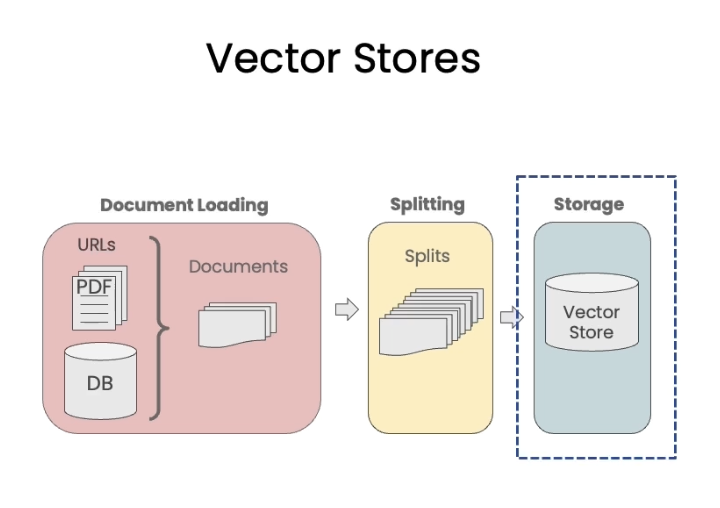
문서를 청크 단위로 나누었으니, 이제 이들을 벡터 스토어에 저장해야 한다.
각 청크들을 인덱스에 넣어 벡터 스토어에 저장하면 쉽게 접근하고 검색(retrieve)할 수 있게 된다.
임베딩이란? (Embeddings)
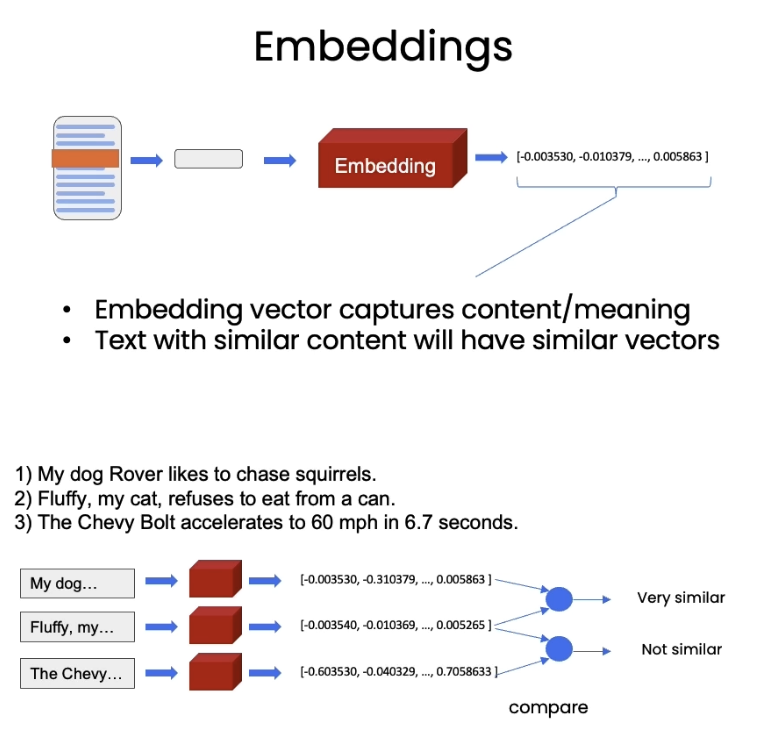
임베딩은 텍스트의 각 부분을 대표하는 숫자를 만드는 과정이다.
비슷한 내용의 텍스트는 비슷한 벡터를 가진다.
즉, 벡터를 비교하면 비슷한 맥락을 가지는 텍스트를 알아낼 수 있다.
벡터 스토어란? (Vector Store)
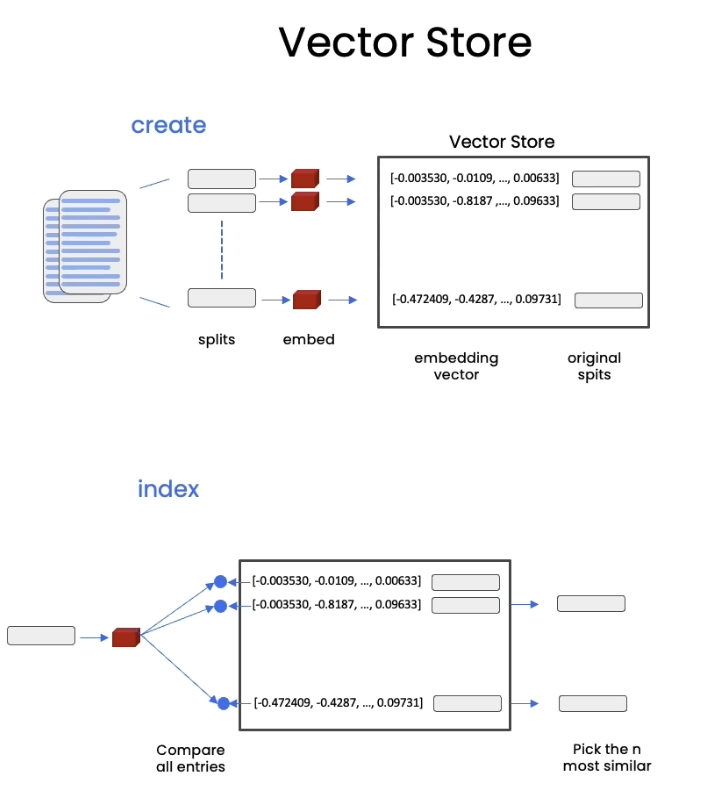
벡터 스토어는 그냥 DB이다. 비슷한 텍스트가 뭘까? 하며 들여다볼 수 있는..
상단 그림과 같이,
1. 문서 수집
2. 문서를 splits로 나누기
3. splits들을 embedding 하기
4. embedding들을 vector store에 저장하기
순서인 것이다.
하단 그림을 보면,
1. 질문을 embedding
2. 질문 embedding과 vector store의 vector들을 비교
3. 'n most similar' 벡터 고르기
4. 이후 고른 벡터, 그리고 질문을 LLM에 넣어 답변 받기
순서이다.
i. (앞선 예시들과 별개로) 문서 로딩하고 Recursive Charracter 스플리터로 스플리팅 하기
# Vector stores and Embeddings
from langchain.document_loaders import PyPDFLoader

# Load PDF
loaders = [
    # Duplicate documents on purpose - messy data
    PyPDFLoader("docs/lectures/MachineLearning-Lecture01.pdf"),
]
docs = []
for loader in loaders:
    docs.extend(loader.load())

# Split
from langchain.text_splitter import RecursiveCharacterTextSplitter
text_splitter = RecursiveCharacterTextSplitter(
    chunk_size = 1500,
    chunk_overlap = 150
)

splits = text_splitter.split_documents(docs)

len(splits)
ii. 임베딩 실험
# Embeddings
# Let's take our splits and embed them.

from langchain.embeddings.openai import OpenAIEmbeddings
embedding = OpenAIEmbeddings()

sentence1 = "i like dogs"
sentence2 = "i like canines"
sentence3 = "the weather is ugly outside"

embedding1 = embedding.embed_query(sentence1)
embedding2 = embedding.embed_query(sentence2)
embedding3 = embedding.embed_query(sentence3)

import numpy as np

np.dot(embedding1, embedding2)
np.dot(embedding1, embedding3)
np.dot(embedding2, embedding3)
임베딩은 OpenAI Embeddings를 사용했다.
이때 처음 두 개의 문장은 비슷하며, 세 번재 문장은 많이 다르다.
임베딩 클래스(embedding.embed_query('문장'))를 사용하여 각 문장을 임베딩 해주고
numpy의 dot product를 해주면
1과 2는 결과값이 0.9xxx... 로 1에 가깝지만
1과 3, 혹은 2와 3은 결과값이 0.7xxx... 에 불과하다.
iii. 실제 데이터를 Chroma 벡터 스토어에 임베딩하기
# Vectorstores
# ! pip install chromadb

from langchain.vectorstores import Chroma

persist_directory = 'docs/chroma/'

# 혹시 기존의 다른 정보가 남아있을 수 있으니 비워주는 명령어
# !rm -rf ./docs/chroma  # remove old database files if any

# splits는 이전에 만들어둔 splits
# embedding은 OpenAI Embedding 모델
# persist directory는 Chroma 벡터스토어 경로
vectordb = Chroma.from_documents(
    documents=splits,
    embedding=embedding,
    persist_directory=persist_directory
)

# collection count를 확인해보자. 생성한 splits 개수와 똑같을 것이다.
print(vectordb._collection.count())
LangChain은 30여개의 벡터 스토어와 연동이 되는데, Chroma는 가볍고 in-memory 라고 한다.


